Currency Converter App for Android & Samsung Galaxy
Live rates for 165+ currencies, an AI price scanner and 18 home screen widgets. Works offline and on Wear OS.
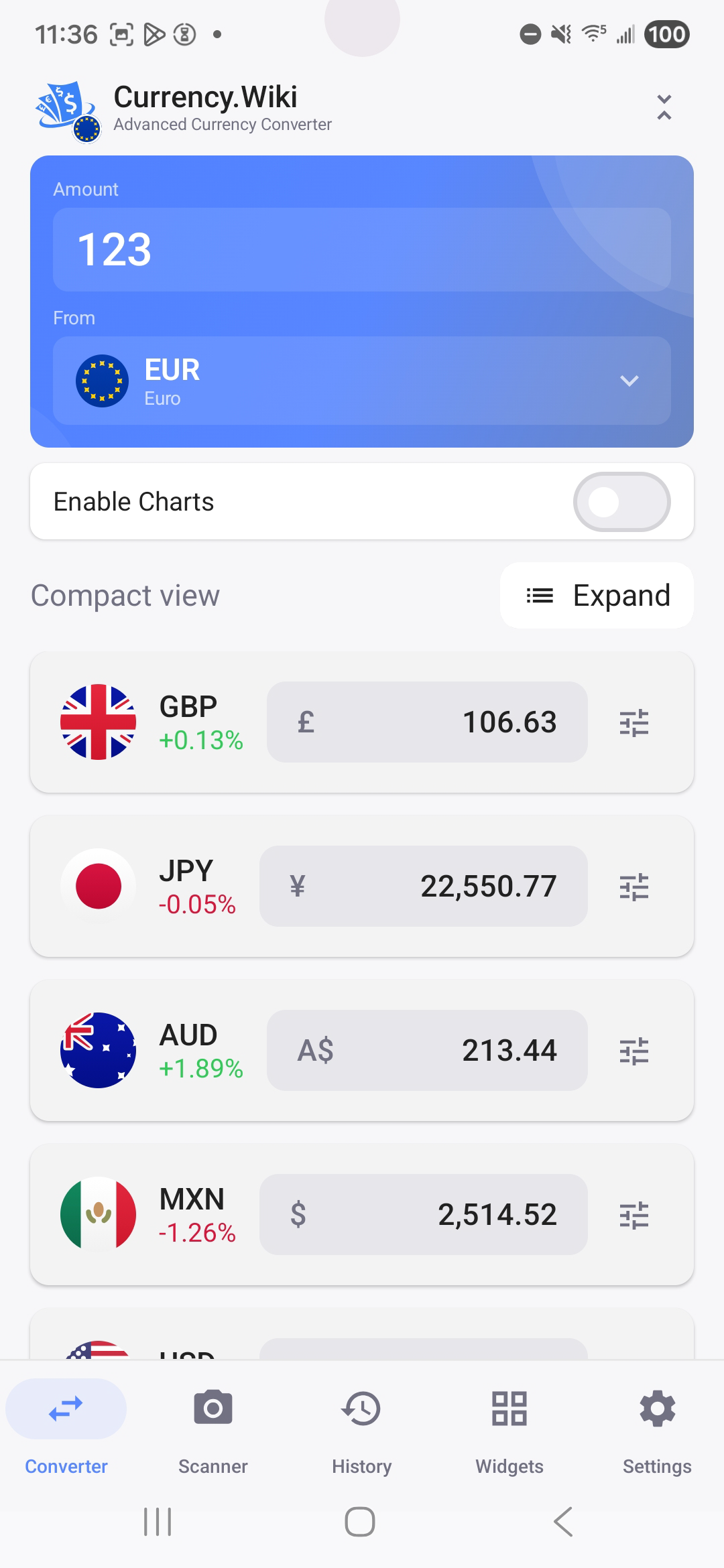
A currency converter built for your Android phone
Currency.Wiki turns your Android phone into a travel-ready currency converter. Check live exchange rates for 165+ currencies, convert prices with your camera, and keep the rates you follow on your home screen with a currency converter widget.
It works on Samsung Galaxy, Google Pixel, Motorola, OnePlus, Xiaomi and any other phone running Android 8.0 or newer, and it keeps converting offline when you have no signal abroad.
Powerful Features
Theme Options
Choose between light, dark, or auto theme with our signature blue accent.
Offline Mode
Convert currencies without internet. Perfect for traveling.
AI Price Scanner
Scan prices with your camera using OCR and AI. Instantly convert any price you see.
Home Widgets
Resizable widgets for instant rate checks from your home screen.
Wear OS
Quick conversions right from your smartwatch.
Historical Charts
View historical exchange rates with beautiful charts.
See It In Action
Real-time conversion, right where you need it

Home Screen Widget
Live exchange rates pinned to your home screen — no app launch needed.

Price Scanner
Point your camera at any price tag and get the converted amount instantly.

Scan Results
Every detected price shown in your currency, side-by-side with the original.

Live Price Tag Reader
Hold your phone over a price tag — see the converted amount overlaid in real time.

Historical Charts
Track exchange rate trends with detailed historical charts and indicators.

Get it on your phone in seconds
Scan the QR code with your phone camera, or tap the button below to open Google Play directly.
Open in Google PlayWorks on your phone
Any phone running Android 8.0 or newer, plus Wear OS watches.
-
Samsung Galaxy
Galaxy S26, S26 FE, S25, S24, Z Fold8, Z Flip8 and the A series
-
Google Pixel
Pixel 11, Pixel 10, Pixel 9 and earlier
-
Motorola
razr, edge and moto g series
-
OnePlus, Xiaomi and more
Any phone from any brand on Android 8.0 or newer
-
Wear OS watches
Galaxy Watch, Pixel Watch and other Wear OS watches
Frequently asked questions
Does Samsung Galaxy have a built-in currency converter?
Not anymore. The Samsung Calculator app still has a unit converter for length, weight and temperature, but its currency converter is no longer available in current One UI versions. Currency.Wiki fills that gap with live rates for 165+ currencies, a home screen widget and a camera price scanner, on every Galaxy phone from the S26 and S25 to the A series.
Does Google Pixel have a currency converter?
Pixel phones don't come with a dedicated currency converter app. You can search Google for a quick rate, but that needs a connection every time. Currency.Wiki adds home screen widgets, offline conversion, rate charts and AI price scanning on the Pixel 11, Pixel 10 and older Pixels.
How do I add the currency converter widget to my home screen?
Install the app, then touch and hold an empty spot on your home screen, tap Widgets, find Currency.Wiki and drag the widget you want onto the screen. There are 18 widgets to choose from, and you can resize them.
Does the app work offline?
Yes. The app keeps the latest exchange rates on your phone, so you can keep converting without internet while you travel. Rates update automatically when you're back online.
Is the app free? Can I remove the ads?
The app is free to download and use. Free users see ads; Currency.Wiki Pro removes the ads and lifts the AI scan limits.
Which phones does it work on?
Any Android phone or tablet running Android 8.0 or newer, including Samsung Galaxy, Google Pixel, Motorola, OnePlus and Xiaomi, plus Wear OS watches such as the Galaxy Watch and Pixel Watch.
Also Available On
Download Currency.Wiki for Android
Free on Google Play. Scan, convert and check rates wherever you travel.


